[ HEALTHCARE ]
[ AUDIT TRAIL ]
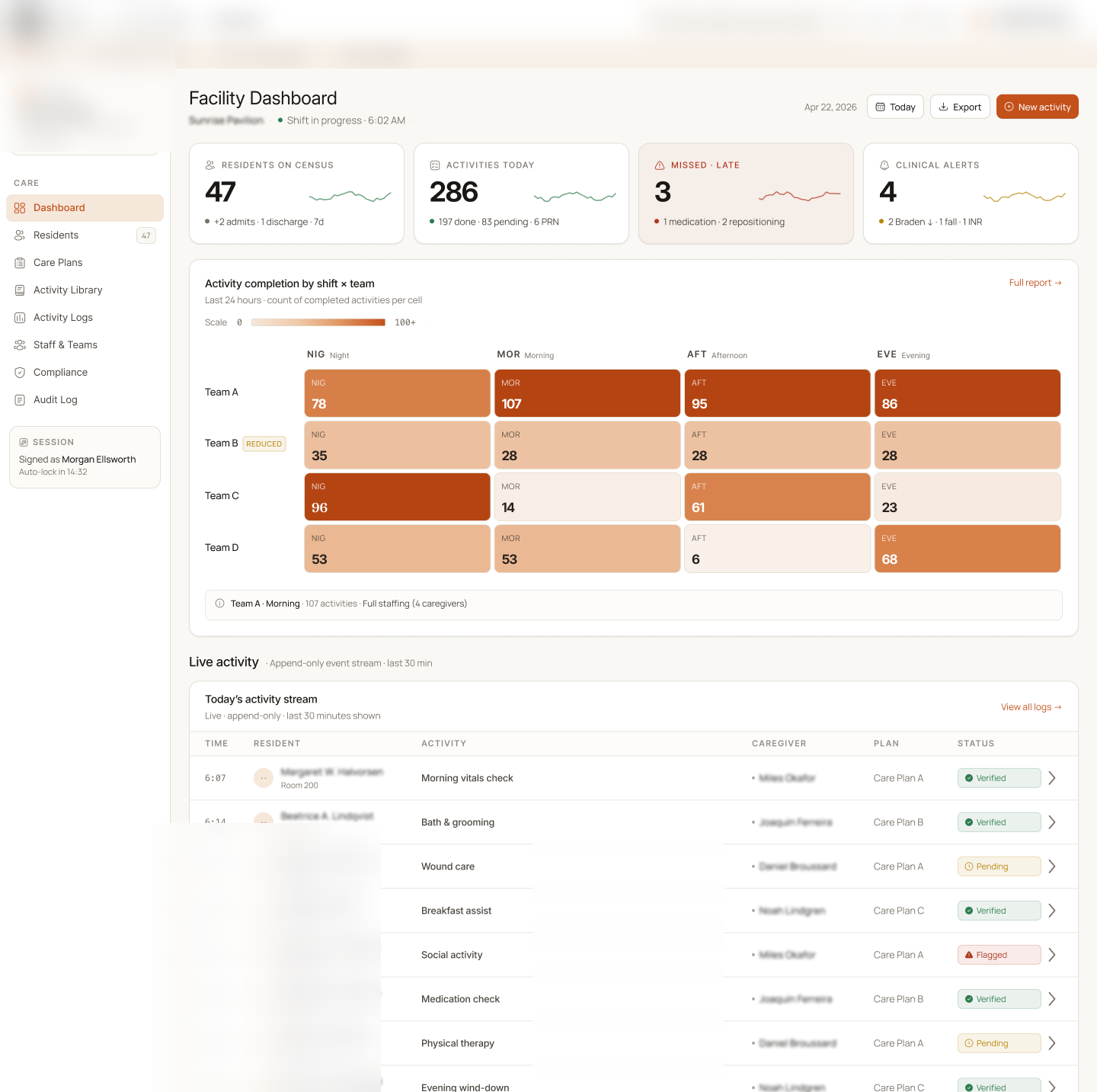
A full-stack case lifecycle system for senior living placement coordinators. Residents are tracked from their source facility into Assisted Living or Independent Living, with every status change enforced by the server and recorded in an audit event.
7
Lifecycle states, enforced server-side
5
Touchpoint types logged (call, text, email, tour, document)
14 days
Aging threshold for stale-case alerts
0
Ways to edit or delete a logged touchpoint
[ THE CHALLENGE ]
A senior living placement operator was moving residents through their pipeline with nothing enforcing the sequence and nothing recording who changed what.
Cases moved between statuses without validation or guardrails. Nothing stopped a case from skipping the stages in between.
Calls, emails, tours, and documents lived across separate systems. Reconstructing what was said to a family meant checking several places.
Once a case moved, there was no record of who moved it or why. Tracing a placement decision after the fact was impossible.
Residents sat in the pipeline with no alert. Nobody knew which stage was the bottleneck until someone went looking.
Case distribution, bottleneck stages, and stale cases were compiled by hand instead of read off the system.
Healthcare placement requires traceable decision history. Without one, the operator was carrying that exposure on every case.
[ THE SOLUTION ]
We built the placement pipeline as a state machine that lives in one place on the server, a communication log that can only be appended to, and a metrics layer that reads case age off the record instead of off a spreadsheet.
01
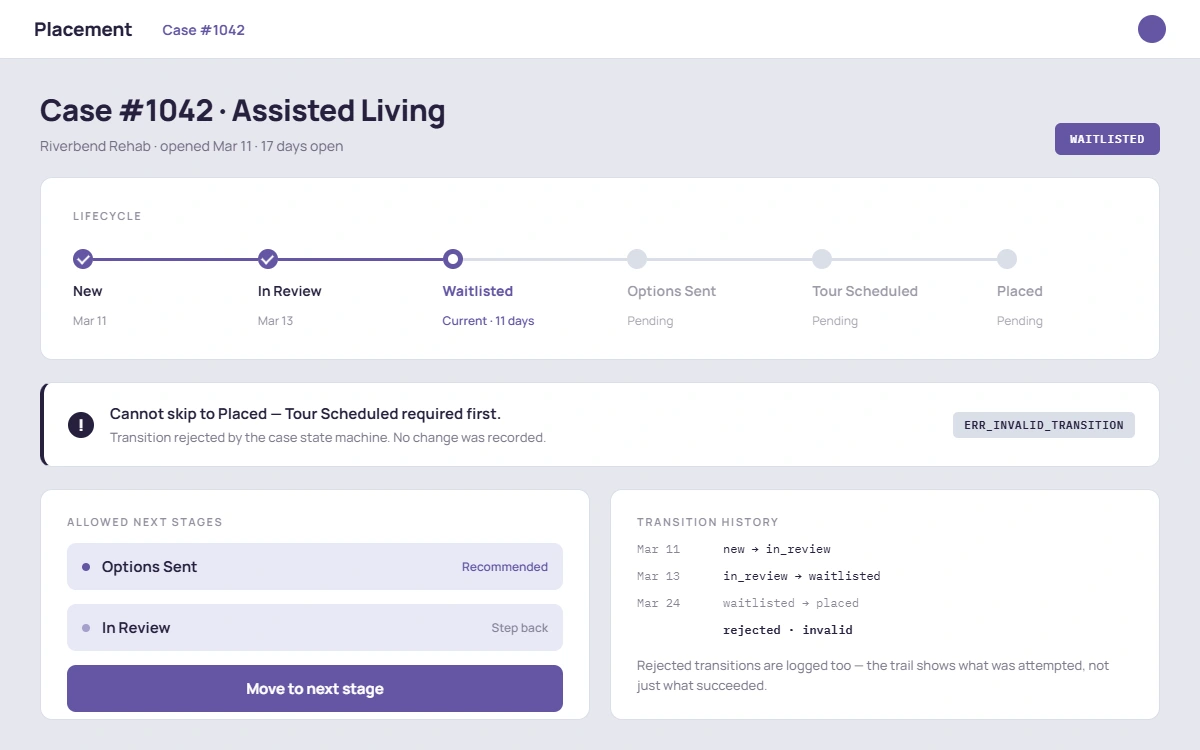
A case cannot skip or jump states. The transition map is defined once, server-side, and checked on every status change.
02
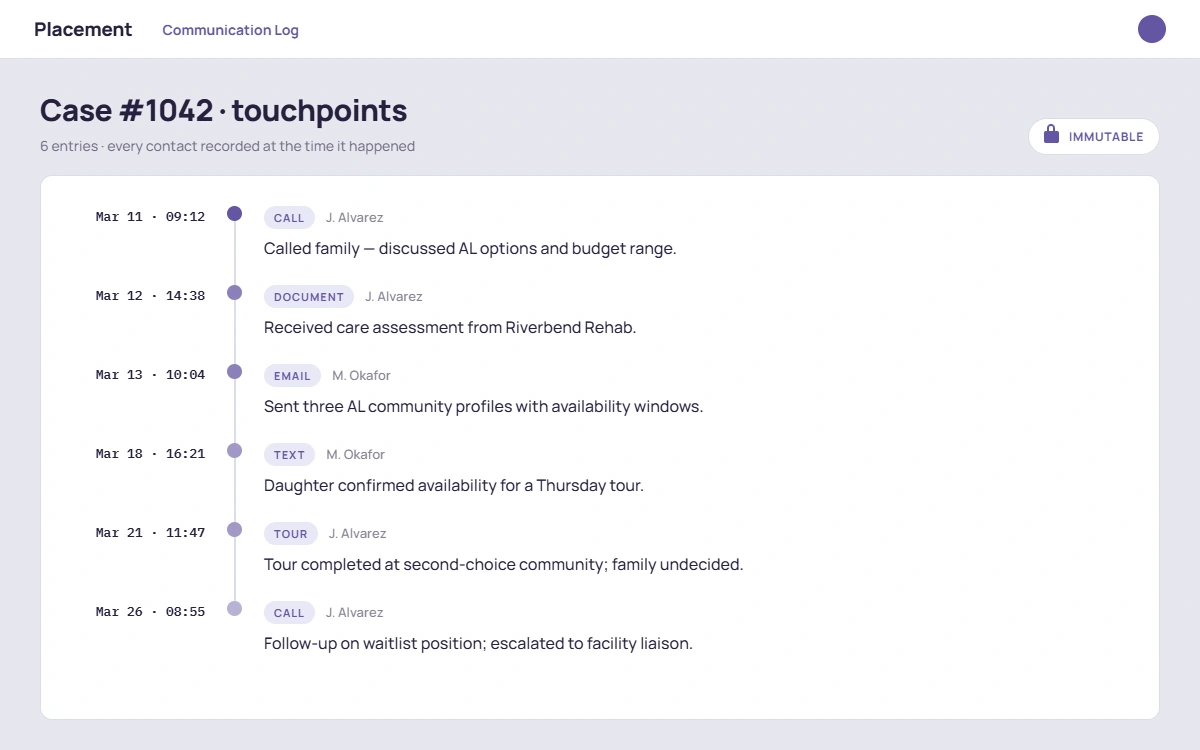
Every touchpoint with a resident or family is written once and kept. Nothing in the history can be rewritten later.
03
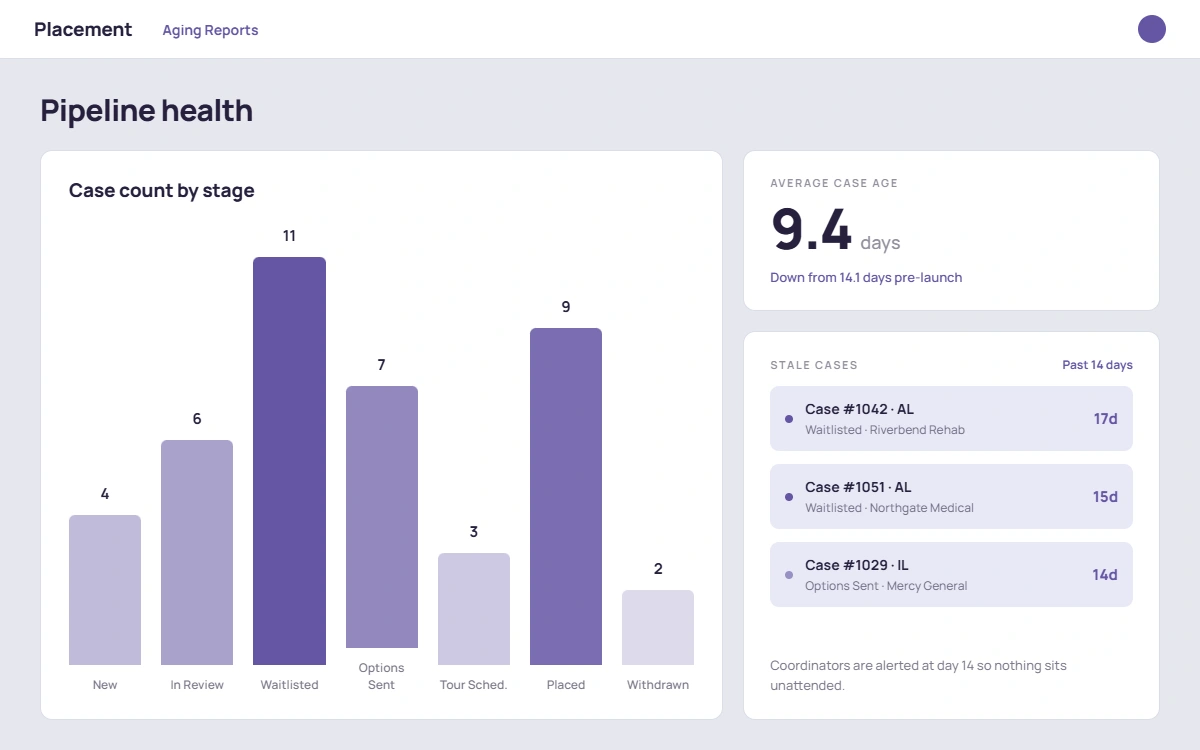
Case distribution, bottleneck stages, and stale cases are read live off the data instead of assembled by hand.
[ SEE IT WORK ]
One flow, one recording: a case comes in, moves through review to placement, and the audit trail shows exactly who moved it and why.
Case lifecycle walkthrough
Intake → review → placement, with every transition and touchpoint recorded. Full video in progress.
[ THE LIFECYCLE ]
Seven states, one legal path between each pair. A case that has not had options sent cannot have a tour scheduled, and a placed case cannot be reopened by a status edit.
NEW
Case created with resident, source facility, target type (AL or IL), and priority. Moves to review only.
IN_REVIEW
Coordinator assesses fit. From here the case can be waitlisted, sent options, or closed as lost.
WAITLISTED
No capacity at the target yet. The case can still move to options sent or be closed as lost.
OPTIONS_SENT
Communities presented to the family. Next legal step is a scheduled tour, or closed as lost.
TOUR_SCHEDULED
Tour booked at a target community. Resolves to placed or closed as lost.
PLACED
Resident moved into the community. Terminal state, no further transitions accepted.
CLOSED_LOST
Case ended without a placement. Terminal state, and the reason is on the audit record.
AGING WATCH
Any open case past 14 days surfaces in the alert list, whichever stage it is sitting in.
[ TRACEABILITY ]
Healthcare placement needs a defensible decision history. Every status change on this system writes a structured audit event, so the record of a resident's path exists whether or not anyone thought to write it down.
These are the same patterns behind a records system for a care setting. If you need software like this, built for your care setting, that work lives under custom EHR development, and the wider vertical is on our healthcare page.
Each status change records from status, to status, who changed it, and the stated reason, as structured JSON attached to the case.
The audit event is written by the transition itself. A coordinator cannot move a case and skip the record.
The communication history is append-only, so the record of what was said to a family cannot be revised after the fact.
Open case age is measured from creation, closed case age from closure. Unrelated edits do not make a stale case look fresh.
The case detail view returns the case with its touchpoints and its audit events together, so the whole path reads in one place.
Tests assert that invalid transitions are rejected, that valid ones write the right audit metadata, and that the aging math is correct.
[ TECH STACK ]
[ DELIVERED ]
Capabilities in the delivered system, described as built. This is the closest thing we have shipped to a records system for a care setting: lifecycle, audit trail, and compliance-grade traceability around a resident.
Enforced
Case lifecycle
A case can only follow a legal path through the pipeline. Skipping stages returns an error instead of a silent status write.
Append-only
Communication history
Calls, texts, emails, tours, and documents recorded against the case and kept as written. No edit path, no delete path.
Traceable
Every status change
Structured audit events carry from status, to status, who changed it, and why, generated automatically by the transition.
Live
Metrics and alerts
Case distribution per stage, average age of open cases, and a standing list of anything open past the aging threshold.
★★★★★
“Everything was done professionally, with efficient and fast communication, unconditional availability, kindness and professionalism.”
Goran Dojčinović
Lawyer, Dojčinović Law Office
Client review · related engagement · Verified review · Clutch, 5.0[ FAQ ]
[ MORE CASE STUDIES ]
LEGAL TECH · HIPAA
HIPAA-compliant case management platform for structured settlements. Three portals, audit-ready from day one.
Read the case studyFINTECH · ESG
ESG intelligence platform for fund managers: sustainability performance, SDG alignment, compliance-ready reports.
Read the case studyLEGAL TECH · SEARCH
Semantic search across 1M+ documents in 100ms. $224K+ in annual savings for the firm.
Read the case studyHEALTHCARE · HIPAA-READY
AI-powered continuing medical education: quiz generation from PDFs and PubMed, verified credit tracking, gamification.
Read the case studyLEGAL TECH · OPEN SOURCE
Open-source Model Context Protocol connectors for Clio, MyCase, Filevine, and IntakeQ. MIT licensed, ABA Opinion 512 audit logging built in.
Read the case study[ GET STARTED ]
We build lifecycle systems for care settings: enforced workflow, immutable history, and an audit trail that holds up when someone asks how a decision was made.
