Running Claude across MyCase, LexisNexis and Microsoft 365 at a mid-size firm
Three connectors, one firm. What Claude reads and writes in MyCase, Lexis+ and Microsoft 365, which plan each needs, and where a mid-size firm needs help.
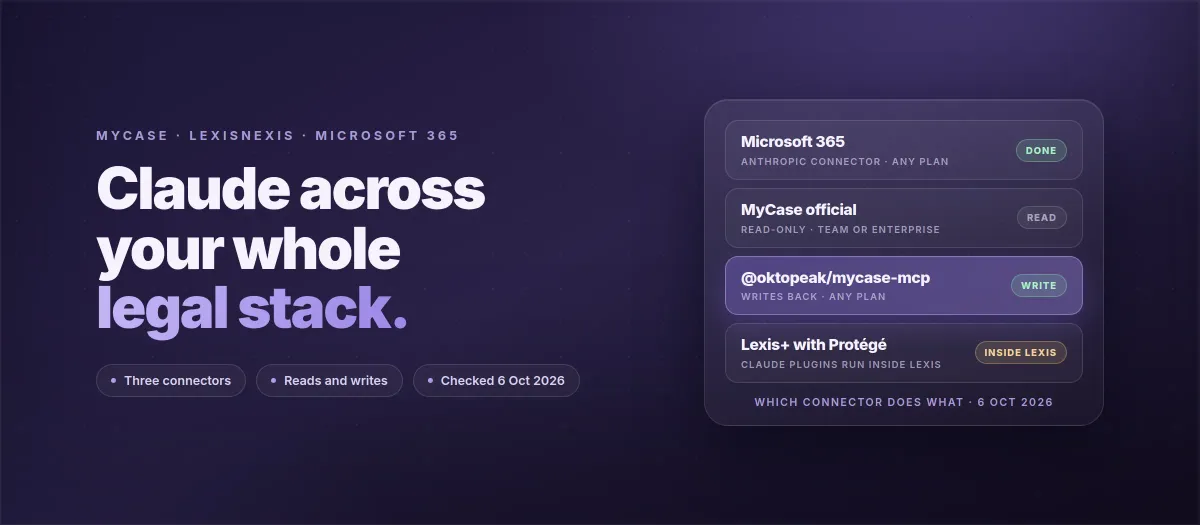
Three connectors, three gates: Microsoft 365 works on every Claude plan with writes off by default; MyCase's official connector is read-only and needs Team or Enterprise; the open-source @oktopeak/mycase-mcp connector writes back on any plan.
LexisNexis runs Claude's legal plugins inside Lexis+ with Protégé and sells its APIs separately, through an API specialist, priced by product and volume. Ask your account team what your agreement includes before planning a Lexis workflow.
Two of the five workflows a mid-size firm runs across this stack, intake to matter and the unbilled time sweep, need a write into MyCase. That is where the free official connector stops.
A firm should switch the vendor connectors on itself; writes, the audit log and the three-system workflows are the parts worth scoping with help.
Yes, Claude can work across MyCase, LexisNexis and Microsoft 365 at the same time, through three separate connectors with three separate plan gates. Anthropic's Microsoft 365 connector works on every Claude plan and reads Outlook, SharePoint, OneDrive and Teams, with writes off until an administrator turns them on. MyCase's official Claude connector is read-only and needs Claude Team or Enterprise; the open-source @oktopeak/mycase-mcp connector, which Oktopeak maintains, writes back on any plan. LexisNexis runs Claude's legal plugins inside Lexis+ with Protégé rather than the other way round, and sells its own APIs separately from the seats. A firm of 6 to 20 people can switch the first two on itself; the writes and the workflows that cross all three systems are where it usually needs help.
connectors, each with its own plan gate and its own read or write rule.
73
read actions in MyCase's official connector. Writes are a separate beta.
18
tools in the open-source MyCase connector, three of them writes.
1
Global Admin consent for Microsoft 365, once, for the whole firm.
We wrote this page for a specific firm: six to twenty people, MyCase as the practice management system, Lexis+ for research, Microsoft 365 for mail and documents, already paying for Claude, and already past the first step. Their administrator had set up the Microsoft 365 connector himself and then stopped, because the next two systems do not work the same way and nobody's documentation says so in one place. This is that one place. It covers what each connector reads and writes, which Claude plan unlocks it, the five workflows a firm this size actually runs across all three, and which parts a firm should do itself.
Claude reads
Claude writes, after the firm turns it on
Claude runs inside Lexis+ Protégé, not the other way round
What does each connector do, and which plan does it need?
The word "integration" hides three different mechanisms. Microsoft 365 is an Anthropic-built connector that lives inside Claude. MyCase is a vendor-built connector in Claude's directory, with an open-source alternative that runs on your own machine. LexisNexis went the other direction and put Claude inside its own product. The table first, then each one in detail.
Connector
Claude reads
Claude writes
Claude plan
Who switches it on
Microsoft 365 (Anthropic)
Outlook mail and shared mailboxes, calendar, SharePoint, OneDrive, Teams chats and channels, meeting transcripts and recordings
Off by default Mail, calendar, files, Teams posts once an admin enables them
Any plan
Org owner on Team or Enterprise, each member on Free, Pro and Max; a Microsoft Global Administrator consents once
MyCase official (8am)
Cases, contacts, leads, tasks, calendar, documents, notes, messages, time, billing, invoices, trust, custom fields
Beta only Enrolled firms only, off by default, not undoable from Claude
Team or Enterprise
Any MyCase user from Claude's directory, with a MyCase sign-in
@oktopeak/mycase-mcp (open source)
Cases, contacts, tasks, documents, calendar, staff, time entries, billing summary
Today Create a case, create a task, log a call
Any plan, any MCP client
Someone comfortable with a config file, with MyCase API credentials from MyCase support
LexisNexis (Lexis+ with Protégé)
Claude's legal plugins run inside Lexis over its 200 billion documents
Not from Claude
Per your Lexis agreement
Your LexisNexis account team
Microsoft 365: any plan, one consent, writes off until you say so
Anthropic's article is plain about availability: the Microsoft 365 connector "is available on all Claude plans: Free, Pro, Max, Team, and Enterprise." On Team and Enterprise a Claude organization owner enables it for the firm; on the consumer plans each person connects their own account. Either way a Microsoft Global Administrator has to grant one-time consent, which adds two service principals to your tenant, one for the client and one for the server. Permissions are delegated, so each attorney sees in Claude exactly what their own Microsoft login can see, and nothing more.
What it reads is wide: primary and shared mailboxes, calendar events, SharePoint and OneDrive files, Teams chats and channel messages, and meeting transcripts and recordings. What it writes is off by default. Once an administrator turns writes on, Claude can send and forward email, create and update calendar events, create and update files in OneDrive and SharePoint, post and reply in Teams, and manage drafts and mailbox settings. Not supported, as of this check: OneNote, In-Place Archive mailboxes, attachments on write operations, and personal Outlook or Hotmail accounts.
The firm we wrote this for had "completed" this connector. In practice that means the consent was granted and reads work. Whether writes are on is a separate decision, and it is the first thing we ask.
MyCase: an official read-only connector, and an open-source one that writes
Since September 2026 MyCase ships an official Claude connector, built by its parent company 8am. It is free on all paid MyCase plans, installs in three steps from Claude's directory, and inherits every user's existing MyCase permissions, so a paralegal who cannot open a billing screen in MyCase cannot read it through Claude either. MyCase's support article counts 73 actions across cases, contacts, leads, tasks, calendar, documents, notes, messages, time, billing, invoicing and trust, and states the design rule directly: looking things up "without ever creating, updating, or changing a record."
Two gates matter. The connector requires a Claude Team or Enterprise plan, which MyCase explains by pointing at training: those plans exclude firm data from model training by default, consumer plans may not. And writes exist only as a beta. MyCase's tool catalog badges write tools as beta, says they are off by default and appear in Claude only for firms enrolled in the write beta, tells firms to email MyCase support to ask about enrolling, and warns that writes cannot be undone from Claude because the connector exposes no delete tools.
The open-source @oktopeak/mycase-mcp connector, which we maintain, is the other route, and we cover the difference in its own section below. It needs MyCase API credentials, which MyCase issues through support to firms on its Advanced plan, the tier that includes the Open API. If your administrator says "we already have the tier and API access," that is what they mean, and it is the signal that the writing workflows can start now.
LexisNexis: Claude inside Lexis, not Lexis inside Claude
On 13 May 2026 LexisNexis announced that Lexis+ with Protégé integrates Anthropic's Claude legal plugin suite, running inside the Lexis environment and grounded in Lexis content with Shepard's trust signals. That is the verified direction: Claude's plugins operate inside Lexis+, and the February 2026 commercial preview of Anthropic's legal plugin inside Protégé came first.
LexisNexis does sell APIs, separately from Lexis+ seats: a new Protégé API, REST APIs for searching and retrieving content and setting alerts, and CourtLink, Lex Machina, State Net and Law360 APIs, behind OAuth 2.0, role-based access, firm-wide throttling and audit logging, licensed through an API specialist and priced by product and volume. The Protégé Legal Data API is positioned at firms of roughly 100 lawyers or more, and Shepard's treatment signals are not documented as an API. On 27 May 2026 LexisNexis's CTO also published the results of testing its own MCP connector against Lexis+ with Protégé, with the attribution bar a connector must clear before it ships. We went through all of it in does LexisNexis have an API, and what a law firm can actually connect.
So for a firm of 6 to 20 people there are three honest shapes: a connector in your own cloud if your agreement includes an API entitlement at a price that fits, research inside Protégé with the memo and matter record in Claude and your practice system, or citation extraction in Claude with the attorney running Shepard's in Lexis. Before anyone plans a workflow around "Claude pulls from Lexis," ask your account team in writing what the agreement includes, and open Claude, choose Connectors, then Browse, and search for Lexis to see what your organization already has.
What can the official MyCase connector not do, and what does the open-source one add?
This is the question most firms on Team actually have, because the official connector is free and two minutes to install. The short version: if you only read, use theirs. If your workflows need to put something back into MyCase today, you need the write beta or the open-source connector, and the two do not conflict.
MyCase official connector
Reads everything you are allowed to see. Changes nothing.
Read-only by design: no create, update, add, remove, convert, reply or delete, outside the beta.
Claude Team or Enterprise only. Pro and Max accounts cannot install it.
Runs in Claude only; not in Claude Code, Cursor or another MCP client.
Free, two-minute install, permissions inherited from MyCase.
Write beta: off by default, per-firm enrollment through MyCase support, writes not undoable from Claude.
Right choice for a Team or Enterprise firm that reads MyCase in chat and nothing more.
@oktopeak/mycase-mcp, open source
Writes back today, on any plan, with a log.
18 tools. Writes: create a case, create a task, log a call (the call tool is experimental and sits behind a flag).
Any Claude plan, any MCP client, MIT licensed, runs on the firm's own machine.
Tokens encrypted at rest with AES-256-GCM, key held in the operating system keychain, never in a config file.
Append-only local audit log of every call, which the firm can export for its own records.
Needs a client id and secret from MyCase support, on the Advanced plan. Firms report about 13 business days for credentials.
Right choice when a workflow has to create the matter or the task, or when the firm is not on Team or Enterprise.
Running both is normal. The official connector for every attorney who reads, the open-source one for the two or three people whose workflows write. Neither sees the other, and both inherit the MyCase permissions of the signed-in user.
Already on Microsoft 365 and stuck on the rest?
We connect MyCase for your first attorney on the call, then scope the writes and the three-system workflows for the whole firm, in writing, with a fixed price.
Which five workflows does a 6 to 20 person firm run across the three?
Every useful workflow across this stack has the same shape: Claude reads from one or two systems, reasons, and writes into one, and a named person approves anything that leaves a draft. Two of the five below need a write into MyCase, and that is exactly where the official connector stops and the open-source one or the write beta begins. None of them runs unattended on a Team or Enterprise chat plan; scheduled, unattended work belongs on the API, covered in the plan section.
1. The morning matter brief
Reads
MyCase: open matters and tasks due this week, through either MyCase connector. Outlook: the threads on each of those matters. Calendar: what is on today.
Thinks
What is on fire, what went quiet, which client has not replied in ten days, which task has no owner.
Writes
One brief into a SharePoint document, if Microsoft 365 writes are on; otherwise it stays in the chat. Nobody approves, it is a report. The best first workflow to demo.
2. Intake email becomes a matter
Reads
Outlook: the thread with the new client, the referral note, the attachments listed.
Thinks
Drafts the matter record, the contact entries, the practice area and the first three tasks, and the reply to the client.
Writes
Creates the case and the tasks in MyCase through the open-source connector, or through the official one once your firm is in the write beta. The reply waits in Outlook as a draft for a paralegal to send. This is the workflow the read-only connector cannot do.
3. Research memo with authority, filed under the matter
Reads
The facts and the issue from the MyCase matter. The research itself runs in Lexis+ with Protégé, where Claude's plugins live, unless Lexis turns out to be in your Claude connector list.
Thinks
Drafts the memo in Word through Claude for Microsoft 365, as tracked changes against the firm's template.
Writes
Files the memo into the matter folder in SharePoint and closes the research task in MyCase. The attorney approves the memo; the citations are checked in Lexis, not trusted from the chat.
4. The unbilled time sweep
Reads
MyCase time entries for the month. Outlook calendar for the same period. Teams meeting transcripts.
Thinks
Lists the meetings, calls and drafting sessions that look like billable work and have no matching time entry.
Writes
A person logs the time. Where the firm has enabled it, the call note goes into MyCase through the open-source connector's call-logging tool. Billing approves. Usually the fastest route to money a firm this size has.
5. The pre-filing check
Reads
The document list on the MyCase matter. The current draft in SharePoint. The deadline on the calendar.
Thinks
What is missing from the exhibit list, which cited authority is older than the last Shepard's check, which signature block is wrong.
Writes
A Teams message to the responsible attorney with the list, if Teams writes are on. The attorney approves the filing. Claude never files.
What are the data terms on each Claude plan for this stack?
The plan decides more than the price. It decides whether the official MyCase connector installs at all, whether there is an organization owner who can turn writes on and off for everyone, and what you can say to a client who asks where their file went. Here is the honest version, plan by plan, from Anthropic's own articles.
Plan
Training on firm data
Official MyCase connector
What else you get, or do not
Pro, Max
Consumer terms; individual settings
No
No organization owner, no shared connector policy. Fine for one lawyer's test, not a firm's home.
Team
Off by default
Yes
Organization owner enables connectors for everyone. No zero data retention on chat. Where most 6 to 20 person firms land.
Enterprise
Off by default
Yes
SSO and SCIM, audit logs and a Compliance API, per-tool connector policies, a BAA the Primary Owner can turn on. A custom connector has to be reachable from Anthropic's network. Still no zero data retention on chat.
API
Off by default
Not applicable
Zero data retention available at the organization level. The right surface for scheduled, unattended automation, which the chat plans do not promise.
Two more lines that belong in every firm's write-up. Claude Cowork and scheduled tasks run on Anthropic's side, reach only remote connectors, and are not under the BAA, so a connector that lives on one attorney's laptop is invisible to them. And the claim to make to a client is the defensible one: training off, a named plan with commercial terms, permissions inherited from MyCase and Microsoft, and a log of what each connector read and wrote. The firm owns that wrapper, under its own agreements, which is a stronger sentence than any promise about where data does or does not travel.
Who sets up which part?
There are three layers, and a firm this size should do the first one itself.
Layer 1: vendor connectors
You switch these on
Microsoft 365, with Global Admin consent and a decision on writes. The official MyCase connector, if you are on Team or Enterprise. Lexis, per your agreement. An afternoon for an administrator who can follow a vendor article.
Layer 2: writes and the first workflow
Guided MCP Setup
The open-source MyCase connector installed with scoped credentials, the audit log wired into your stack, one of the five workflows built with your team, and training. The first attorney's setup is free; the rest is a short, fixed-price engagement. What Guided MCP Setup covers.
Layer 3: the whole firm
Firm Deployment
Per-attorney sign-in, a remote connector that Enterprise policies and scheduled tasks can reach, one audit log for everything, a security review you can hand to a client. Scoped in weeks, priced in writing before work starts. What Firm Deployment covers.
If you are the administrator who got Microsoft 365 working and then stalled, you are exactly where the firm we wrote this for was. The next step is a thirty-minute call where we look at your Claude plan, your MyCase credentials and your Lexis setup together, connect MyCase for your first attorney, and send a written scope for the rest.
Frequently Asked Questions
Does MyCase have an official Claude connector?
Yes. MyCase shipped an official Claude MCP connector in September 2026, built by its parent company 8am. It is read-only by design, included at no extra cost on all paid MyCase plans, installed from Claude's connector directory with a MyCase sign-in, and it inherits each user's existing MyCase permissions. It works only on Claude Team and Enterprise plans.
Can Claude write to MyCase?
Through the official connector, only if your firm is enrolled in MyCase's write beta: write tools are off by default, appear only for enrolled firms, and MyCase says writes cannot be undone from Claude. Through the open-source @oktopeak/mycase-mcp connector, Claude can create a case, create a task and log a call today on any Claude plan, with a local audit log, provided your firm has MyCase API credentials.
Which Claude plan does a law firm on MyCase and Microsoft 365 need?
Team or Enterprise. The Microsoft 365 connector itself works on every Claude plan, but the official MyCase connector requires Team or Enterprise, and both of those exclude firm data from model training by default. Enterprise adds SSO, SCIM, longer audit logs and a BAA option. Pro and Max are consumer plans and are not the right home for a firm's client data.
Is LexisNexis a Claude connector?
Not as a listed connector, as of 7 October 2026. LexisNexis runs Claude's legal plugins inside Lexis+ with Protégé, the reverse direction, and has tested its own MCP connector without shipping it broadly. What LexisNexis does sell is a separate API portfolio (Protégé API, content search, CourtLink, Lex Machina), licensed through an API specialist and priced by product and volume, which a custom connector in your own cloud can use if your agreement includes it. Ask your account team in writing, and check Browse connectors in Claude, before you plan a workflow around it.
Does the Microsoft 365 connector let Claude send email?
Only after an administrator turns write tools on. Anthropic ships the connector with writes disabled; once enabled, Claude can send and forward mail, create and update calendar events, create and update files in OneDrive and SharePoint, and post in Teams. Attachments on writes, OneNote, In-Place Archive mailboxes and personal Microsoft accounts are not supported.
Can the official MyCase connector and the open-source one run side by side?
Yes. They do not conflict. The official connector is the right choice for a Team or Enterprise firm that only needs to read MyCase in Claude. The open-source connector adds writes, works on any Claude plan and in any MCP client, and keeps a local audit log. Many firms run the official one for everyone and the open-source one for the people whose workflows write back.
Co-Founder and Technical Lead at Oktopeak. Builds regulated software for legal and healthcare teams, and leads the rescues of codebases other vendors left half-finished.
Five ways to integrate Claude AI with MyCase practice management in 2026. Open-source MCP connector, Clerx AI, Smith.ai, Zapier, and custom builds, compared honestly on cost, compliance, and capability.
The first open-source MCP connector for MyCase. Connect Claude directly to your MyCase cases, contacts, tasks, documents, calendar, and billing, without sending client data to AI training. ABA Opinion 512 audit logging baked in.
Lawyers test Claude on Pro, run out after a couple of documents, and jump to Max without knowing what they actually need. Here is how to choose between Pro, Max, the API, and Enterprise for a law firm, by usage limits, cost, and what each one does with your client data.